 Google Drive
 OneDrive
ด้านล่างนี้คือวิธีเปลี่ยน PDF เป็นฟอร์มแบบกรอกได้
-
เลือกเอกสาร PDF ที่มีอยู่
คลิ๊ก 'อัพโหลด' เพื่อเลือกไฟล์. ไม่มีเอกสารใช่ไหม? เริ่มด้วยเทมเพลตว่าง.
-
เพิ่มฟิลด์ฟอร์มแบบกรอกได้ลงในฟอร์ม PDF ของคุณ
ตรวจสอบเนื้อหาในเอกสารของคุณและเพิ่มฟิลด์ฟอร์มแบบกรอกได้ในจุดที่จำเป็น.
คุณสามารถเลือกประเภทฟิลด์ต่อไปนี้ได้:
- Text Field: ข้อความบรรทัดเดียว
- Textarea: ข้อความหลายบรรทัด
- Radio: เลือกได้เพียงอย่างเดียวจากกลุ่ม
- Checkbox: ติ๊กเลือกได้มากกว่าหนึ่งข้อ
- Dropdown: เลือกหนึ่งตัวเลือกหรือมากกว่าจากรายการ Dropdown
- กล่องลายเซ็น: กล่องลายเซ็นเพื่อให้คนอื่นเซ็น
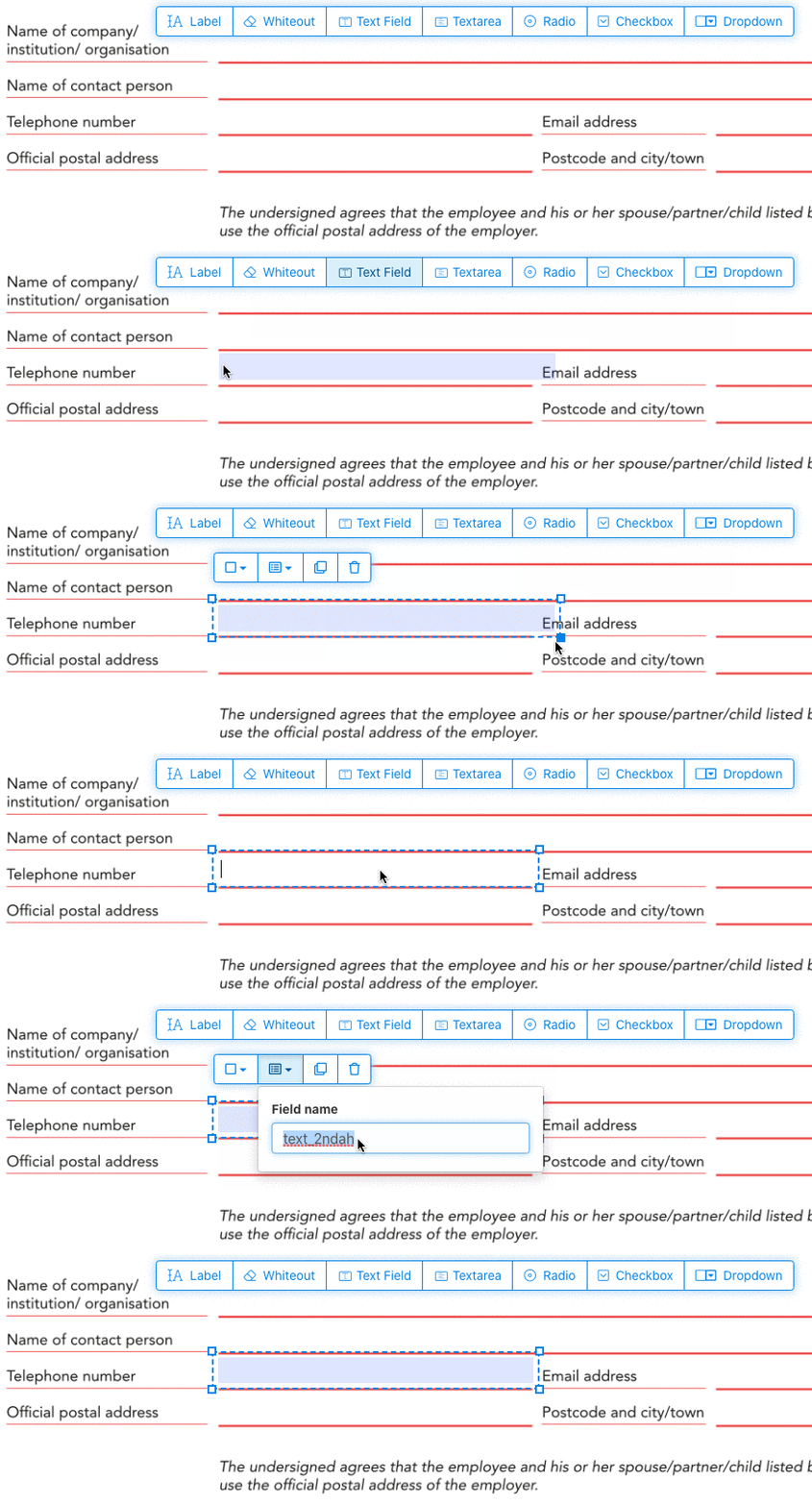
วิธีสร้าง Text Field ใน PDF แบบกรอกได้
คลิกที่รายการ Text Field จากเมนู. แล้วคลิกบนหน้าเพื่อวาง Text Field ใหม่.
![]()
สร้าง Checkbox, Radio button หรือ Dropdown
ฟิลด์ฟอร์มอื่นๆ ก็เพิ่มได้ด้วยวิธีเดียวกัน.
Radio buttons are grouped together in unison by using the same form field name for all buttons. This ensures only one is selected at the same time. When the user selects one, the other radio buttons in the group are deselected.
เปลี่ยนสีเส้นขอบ. Configure text color in PDF form fields
ใช้ฟิลด์ฟอร์มแบบขอบโปร่งใสหรือเลือกสีที่ชอบได้เลย. The color of the text of the PDF fields can be configured.
The text alignment can be configured as 'Left', 'Center' or 'Right'. The font size can be set to a specific value or left as 'Auto' to that it automatically adjusts based on the amount of text typed in.
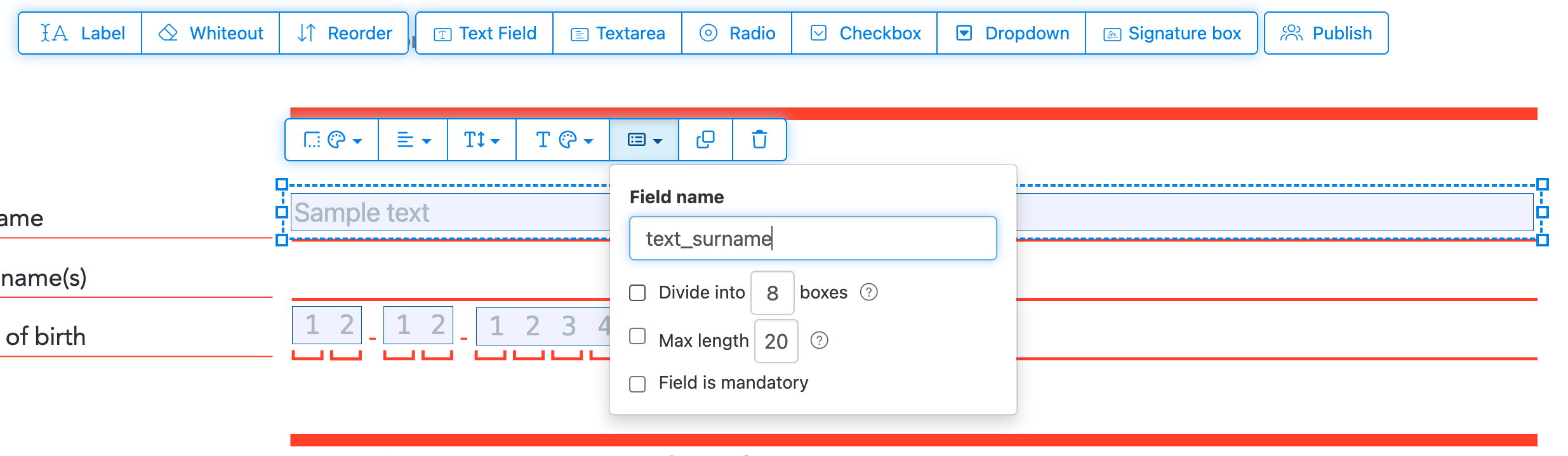
จัดการชื่อฟิลด์ฟอร์มและคุณสมบัติอื่นๆ
กำหนดชื่อให้แต่ละฟิลด์และตั้งค่าคุณสมบัติเฉพาะ เช่น การเลือกหลายรายการ ค่าส่งออก และอื่นๆ.
Mark any field as required, so it must be completed before the form can be submitted. For text fields, you can also set a maximum character length to limit input.
Text fields can be displayed as a comb field, dividing the input area into equally spaced boxes, one per character. Commonly used for date fields, postal codes, ID numbers, and similar structured inputs.
![]()
Change PDF tab order
Need to control the order in which fields are tabbed through? Click 'Reorder' to reorder form fields by dragging and dropping, or auto-sort them by rows or columns.
Align PDF fields, multi-select and duplicate across pages
Select multiple form fields at once and duplicate them to a different page, handy when building multi-page forms with repeating sections.
Use the alignment tools to line up multiple form fields with each other. Align by left, right, top, or bottom edge for a clean, professional layout.
เผยแพร่เพื่อให้ผู้อื่นกรอกและลงชื่อ
Once your form is ready, use 'Publish' button to generate a shareable link. Anyone with the link can open the form, fill it out, and send it back to you by email. The link does not expire and can be shared on a website or in an email.
-
บันทึกเอกสารของคุณ
คลิกที่ 'Apply changes'. เมื่อเสร็จแล้ว ให้บันทึกเอกสารที่อัปเดตของคุณ.
คุณจะได้เอกสาร PDF แบบกรอกได้ที่กรอกผ่านหน้าจอได้ง่ายๆ โดยไม่ต้องพิมพ์.