 Google Drive
 OneDrive
Below we show how to convert PDF pages to JPG, PNG or TIFF images.
-
अपनी फ़ाइलें Upload करें
फ़ाइलें सुरक्षित रूप से एन्क्रिप्टेड कनेक्शन पर Upload होती हैं. फ़ाइलें सुरक्षित रहती हैं. प्रोसेसिंग के बाद, वे हमेशा के लिए डिलीट हो जाती हैं.
क्या आप फ़ाइलें Upload किए बिना ऑफलाइन काम करना चाहते हैं?
Try Sejda Desktop. ऑनलाइन सर्विस जैसे ही फीचर्स, और फ़ाइलें कंप्यूटर से बाहर नहीं जातीं.'Upload' पर क्लिक करें और अपने कंप्यूटर से फ़ाइलें चुनें.
फ़ाइलें ड्रैग और ड्रॉप करना भी काम करता है.
Dropbox या Google Drive फ़ाइलें
आप Dropbox या Google Drive से भी PDF चुन सकते हैं.
'Upload' ड्रॉपडाउन खोलें और अपनी फ़ाइलें चुनें.
-
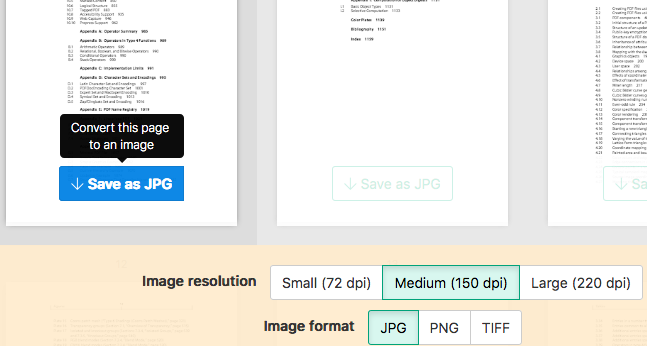
Select an image format
By default PDF is converted to JPG. Alternatively, choose to save your PDF as PNG or TIFF.
-
Select image resolution
Choose between 220 dpi, 150 or 75 dpi. Larger resolution (220 dpi) will output larger images.
-
Choose pages to convert
Click to select pages to convert. By default all pages in the PDF document are converted.
Quickly convert just a few pages?
Press the
Save as JPGbutton on the PDF page to quickly save it as an JPG image. Other image formats also supported.![]()
-
Save your changes
Click the
Convertbutton and thenDownloadan archive containing all the images.