
 Google Drive
 OneDrive
Below we show how to rotate a pdf
अपनी फ़ाइलें Upload करें
फ़ाइलें सुरक्षित रूप से एन्क्रिप्टेड कनेक्शन पर Upload होती हैं. फ़ाइलें सुरक्षित रहती हैं. प्रोसेसिंग के बाद, वे हमेशा के लिए डिलीट हो जाती हैं.
क्या आप फ़ाइलें Upload किए बिना ऑफलाइन काम करना चाहते हैं?
Try Sejda Desktop. ऑनलाइन सर्विस जैसे ही फीचर्स, और फ़ाइलें कंप्यूटर से बाहर नहीं जातीं.
'Upload' पर क्लिक करें और अपने कंप्यूटर से फ़ाइलें चुनें.
फ़ाइलें ड्रैग और ड्रॉप करना भी काम करता है.
Dropbox या Google Drive फ़ाइलें
आप Dropbox या Google Drive से भी PDF चुन सकते हैं.
'Upload' ड्रॉपडाउन खोलें और अपनी फ़ाइलें चुनें.
Step 2: Select pages to rotate
Pages can be rotated 90° clockwise, 90° counter-clockwise or 180° (flipped horizontally)
Rotate all pages
If you want to rotate all pages in the document, make sure All pages is selected. Then, click the rotation to be applied: 90°, 90° or 180°
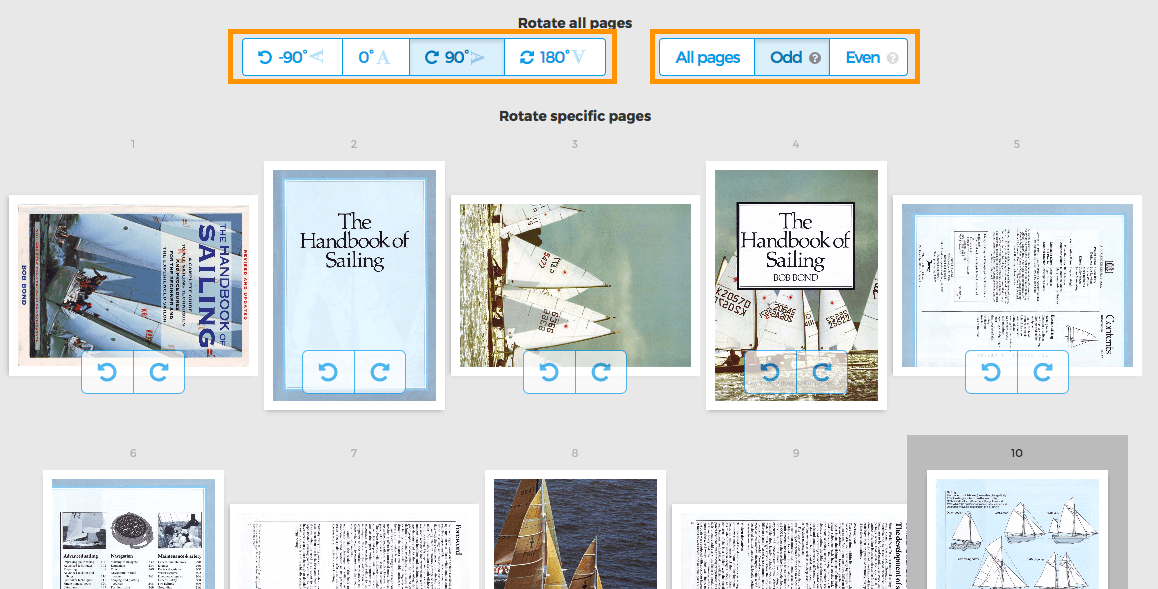
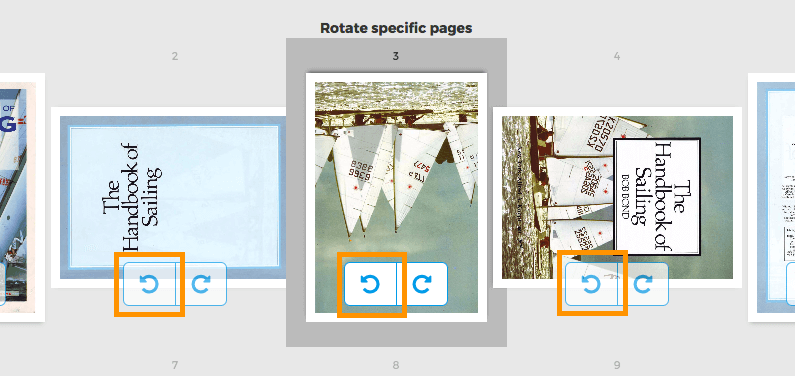
Rotate specific pages
Each page has two buttons to rotate that single page: or
Rotate only odd or even pages
Rotating only odd pages (2,4,6, etc) or all even pages (1,3,5) can also be done. Select either Odd pages or Even pages